Why should I track UTMs for form submissions?
UTM tracking is a way to track the effectiveness of marketing efforts through unique parameters that are added at the end of website hyperlinks. By appending a link with UTM values, marketers can understand the source of traffic for a website visitor, which content or campaign drove the visit, and the referring domain.
UTM data is used for traffic reporting in website analytics platforms like Google Analytics, but it is also beneficial to track UTMs alongside form submissions and contact records. For marketing teams that depend on website forms for their sales motion, stitching UTM data to lead records gives marketers a way to measure ROI and tie specific marketing channels or activities to opportunities, pipeline, and revenue.
UTM values tend to follow a common hierarchy for categorizing traffic, though they can be customized to specific naming conventions if desired. This Campaign URL Builder from Google Analytics is a great way to create UTM-tagged links and understand how they are structured. The typical hierarchy for UTMs, from broadest to most specific, is:
- utm_medium: This broad classification identifies the marketing channel or medium used (e.g. email, paid search advertising, social media)
- utm_source: This identifies which website or entity sent the traffic (e.g. LinkedIn, Google, Facebook, ChatGPT).
- utm_campaign: This field is used by marketers to name the campaign that drove traffic (e.g. fall_sale or inmail_ad).
- utm_content: This field recognizes a specific piece of content that acquired traffic (e.g. product_demo or annual_data_report)
- utm_term: This is used to identify a specific keyword and is often used for paid search advertising
As an example, if you are running a paid LinkedIn advertisement offering gift cards to prospects that take a demo, your URL might look like this:https://www.yoursite.com/form?utm_medium=paid_social&utm_source=linkedin&utm_campaign=gift_card_offer
By capturing UTMs when users submit a website form, this data can be stored in your CRM or contact database, and gives marketing and RevOps teams a better indication of the value of marketing activities, campaigns, and investments. This helps teams better understand ROI, provides qualitative measurement for form submissions, and helps sales teams understand the marketing channel, campaigns, or content assets that compelled a contact to fill out a form.
How do I track UTMs alongside form submissions?
There are a few different ways to capture UTMs for form submissions, some easier than others.
Storing UTM parameters in cookies
Most often, marketing teams will deploy a script that captures UTM parameters and stores them in a cookie leading up to form submission. Within the form, marketers will create hidden form fields aligned with UTM or other attribution values. Upon form submission, the cookie will populate the hidden fields with UTMs and pass this data alongside the contact form notification and submission workflows and into a synced CRM.
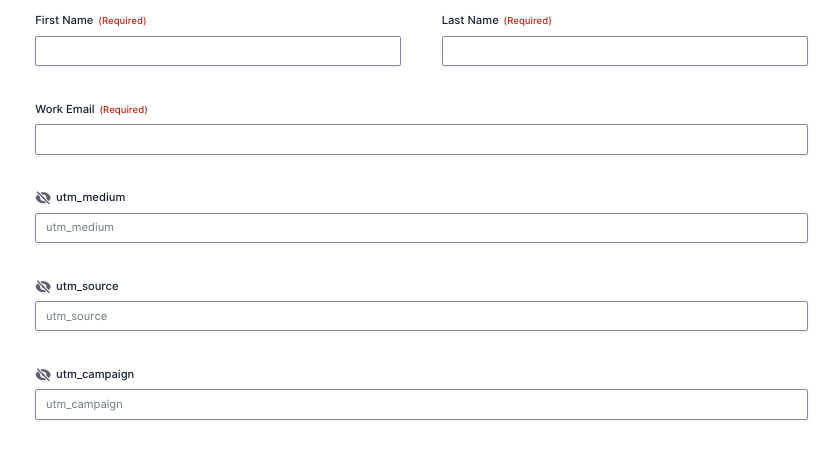
This method is typically the most simple approach for capturing UTMs, but it’s also often the most secure. Digital marketers can host the cookie on a first-party basis, giving no outside visibility into form or CRM data.
At Formfilled, we’re strong proponents of the first-party cookie approach to help maximize the privacy and security of users submitting forms and the organization handling that data. This method can also be the easiest to set up without a need for integrations or API connections, or extensive workflow logic in your CRM/MAP to consistently categorize traffic.
Native attribution in your CRM or MAP
Some CRMs or marketing automation platforms like HubSpot offer UTM and attribution tracking by default. These out-of-the-box features often work well for smaller teams, though there is often a divide between traffic sources without defined UTMs (e.g. organic search or direct) and traffic with UTMs (e.g. paid search or email).
Marketing operations professionals often have to choose a common framework for tracking all sources of traffic between a UTM hierarchy or a proprietary field like Lead Source. To create a standardized report that measures the efficacy of all marketing channels, MOps professionals often have to create workflows to recategorize traffic sources or map data between multiple attribution fields.
This method can also be difficult if you use different platforms for customer relationship management (CRM) and marketing automation (MAP). There can be mismatches between field naming conventions, challenges or limitations with bi-directional syncing, or issues with fields being overwritten over time. For example, teams that use both HubSpot and Salesforce may struggle to sync attribution data into Salesforce and report it alongside pipeline and revenue figures.
Third-party attribution platforms
Many analytics and attribution platforms sync with CRMs or MAPs to provide UTM data or website analytics for specific contact records. These solutions can vary in cost, though many are priced well into 5 figures for an annual subscription. These platforms are typically better suited for bigger enterprises that have time to integrate various MarTech platforms, and have sufficient budget to justify a bigger investment in marketing reporting.
One issue posed by third-party attribution platforms is that data typically lives in an externally hosted dashboard. Sharing marketing attribution data for all team members (e.g. RevOps or sales or GTM leadership) can be limited by your subscription model and the number of seats included. Security concerns are present when CRM records and personally identifiable information are accessible via an external database. Reporting history will also disappear once the platform subscription ends, and capturing reliable year-over-year data is often a challenge for marketing teams that have pivoted on reporting platforms or models.
Integrated databases
The most advanced option for tying UTM data to contact records is via a Business Intelligence (BI) tool like Tableau. Many marketing teams use a common identifier or secret key to stitch website analytics data to CRM records, giving them a complete picture of website activities and browsing history for a particular user.
This approach can be incredibly insightful when properly configured, but it can take significant investment and resources to implement and maintain. Teams with this level of maturity for UTM reporting often have dedicated data analysts maintaining the database and steep BI tool subscription costs to allow all relevant users to access reports.
The challenges of tracking UTMs in forms
Using UTMs and tracking the source of website leads sounds great, right? It can unfortunately be pretty tricky to get UTM data from forms into your CRM depending on your website setup and technology stack.
If you were to Google search your website form provider alongside “UTM tracking,” you can probably find a forum or support document with a basic script for capturing UTMs. However, these scripts usually have a few major limitations:
- The script or cookie will not store UTM attributes if users navigate to a different page that does not include UTMs in the URL
- The script can only grasp the source of traffic if UTMs exist in the URL
- The script only captures the current session (“last-touch”) attribution details
Let’s break down how these issues impact marketing activities and reporting.
UTM persistence
The most basic UTM tracking scripts reference any UTMs included in the URL, and are able to pass that data into the form if the user converts on that specific page. However, if the user navigates away from that page, the UTM query string will vanish, and – poof – so too will the UTM data you were hoping to capture. This lack of persistence can cause website marketers to act irrationally to try to capture attribution details:
- Marketers may create landing pages that overly emphasize forms or include multiple forms
- Marketers may bias toward bottom-of-funnel campaigns where forms are included on the landing page
- Marketers may aggressively strip out navigation in an attempt to keep a user on the form page
When implementing a UTM tracking solution, ensure you have UTM persistence across multiple pages (or better yet, multiple sessions) so your website managers have flexibility to create a user-friendly experience for campaigns and form pages.
Inferring UTMs for URLs without values
One of the most obvious challenges with UTM tracking is that manually defined links for ad campaigns or specific platforms have UTM values in the URLs, while many organic channels like SEO and direct traffic do not include UTMs. This can result in really disjointed reporting – some channels and campaigns have granular UTM data to report on, while there’s a big bucket of referral sources that might be lumped into generic “Website” or “Other” traffic in reporting.
Marketers should seek a UTM tracking solution that can infer UTMs for URLs where they are not defined. This is generally done by referencing the referring domain value or other attributes that indicate the source of traffic, which is then used to categorize those sources into UTMs. For example, if traffic is referred from google.com, this traffic can be bucketed under an “organic_search” UTM medium and use “google” as the UTM source. This allows all traffic sources to use UTMs as a standardized and consistent method for reporting.
Single-touch tracking
Many tracking solutions only offer UTM details for the session in which a user converted. This often results in a deep bias toward direct traffic and branded search activity, especially for companies with longer sales cycles.
More advanced tracking solutions are able to track users on a multi-touch basis across multiple sessions to help surface various touch points involved in a conversion. At Formfilled, our solution offers both first-touch and last-touch tracking with settings to control the duration of each attribute. We also empower users to override direct traffic sources in an effort to highlight other activities that may have compelled a user to submit a form.
Contact record security
Personally identifiable information (PII) of prospects, customers, and contact records is often the most sensitive information that marketers interact with in their line of work. You may be able to find a Zapier or third-party plugin or unverified solution that helps with UTM tracking for forms, but marketers should be highly wary of any solutions that are:
- Mirroring CRM or contact records in an external database
- Hosting tracking scripts externally
- Have unclear data retention or protection policies
Tracking organized, multi-touch UTM values with Formfilled
Formfilled is on a mission to help marketing teams capture UTMs for form submissions in a simple and secure way. Our first-party cookie solution empowers marketers to maintain consistent attribution data across multiple sessions, tracks first-touch and last-touch UTM data, and is entirely self-hosted for security and privacy. Marketing teams can define custom channel groupings to categorize traffic within UTM values to their liking, and can even adjust UTM values to other naming conventions if they prefer.
If you’re ready to start capturing UTM parameters for your website’s form submissions, check out the Formfilled app today.
